We do the same thing by hand every week.
Somebody on your team spends hours every week on a job that never changes.
- The repeat job runs on its own, in the background
- Your team keeps the judgment, and the copying and chasing stop
- It tells you when it runs, and loudly when it doesn't


Jobs That Piled Up Without a Plan
Every business accumulates these. Copying the same figures from one place into another, sending the same reminder, rebuilding the same list, updating a schedule in three places because three places have to agree.
They're rarely on anyone's job description. Someone absorbed them, and now the business quietly spends a person's afternoon on them every week.
The useful question is which one costs the most and breaks the least when a machine does it.
This calendar used to be built by hand.
A yoga studio we build for still prints a class calendar for the wall every month. Somebody used to rebuild it by hand in a document editor. Now the schedule lives in one place, and the month sheet, the daily images and the website all come out of it.

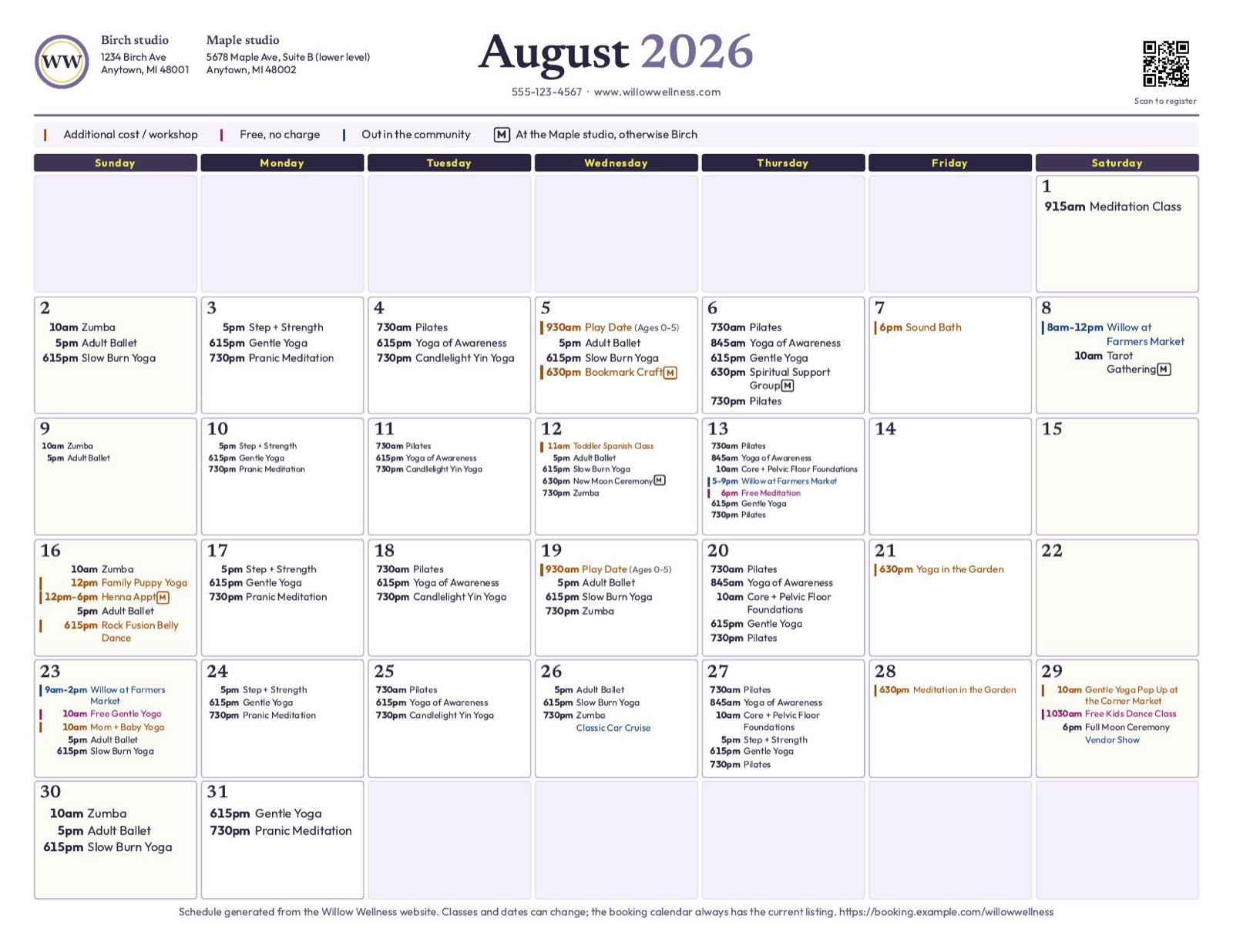
- Before The month was rebuilt by hand in a document editor. Text overlapped its own boxes, the legend drifted, and a class that changed had to be found and fixed in every place it appeared.
- After One schedule file makes the printable month, an image for each day and the listings on the website, so the wall and the site start from the same list.
- Next month Next month's sheet comes out of the same file when the schedule changes, ready for the studio to check.
Three Common Automations
Automations run inside your own accounts, so unlike a website there's no address to send you to. Here's what starts each one, what runs and what you get back.
- A quote request comes in
- Reads what they asked for
- Prices it off your list
- Writes the quote
It's in their inbox, and logged in yours - A client says yes
- Makes the folder
- Raises the invoice
- Sends the welcome note
The job is open and nobody typed the same name four times - The month ends
- Pulls the numbers
- Builds the report
- Checks it against last month
It's waiting for you on the first, already written
We build each one around the tools you already use.
Why the Boring Middle Shouldn't Be a Person's Job
The judgment in these jobs is real, and it stays with your team. What doesn't need a person is the copying, the reminding, and the keeping-things-in-sync.
Take that part away and the work still gets done, without anyone's afternoon disappearing into it.
-
The repeat job, handled
Intake, quoting, follow-up, the report you rebuild every month. The parts of the week that run the same way twice.
-
Wired into what you use
It plugs into the tools you already have rather than replacing them, so nothing new has to be learned.
-
You approve it first
It drafts and you send until you trust it, so nothing goes out unwatched on day one.
-
You keep the override
Every rule is yours to change or switch off. Nothing goes out under your name without a rule you set.
Ready to hand off the job you do every week?
Start a ProjectWhat Comes With an Automation
-
The handoffs that eat the week
Intake, quoting, follow-up, the monthly report. We start with the biggest one, so the difference shows in the first week.
-
Built on your tools
Wired into what you already use, so there's no new platform to move to or learn.
-
A message after every run
You hear each time it runs.
-
Written down in plain words
What it does is written in plain language, so the next person can read it and nothing lives only in one head.
How an Automation Gets Built
A job done by hand becomes one that runs on its own.
We time one normal week
We write down what happens in a normal week, and how many minutes each handoff costs.
We start with the worst one
The biggest, most repetitive handoff goes first, so the difference shows up in the first week rather than the third month.
You approve the drafts first
The automation writes the drafts and you send them, for as long as it takes to trust it. Nothing goes out unwatched on day one.
You keep the override
Every rule is yours to change or switch off.

Why Work With GeekThangs
The judgment stays yours
We automate the copying and the chasing, never the decisions your team makes.
We start where it hurts
The biggest, most repetitive handoff goes first, so the difference shows in the first week.
Written for the next person
What it does is in plain language, so it never lives only in one person's head.
Common Questions
What should we automate first?
The job that costs the most time and breaks the least when a machine does it. We time one normal week to find it rather than guessing.
What changes for my team?
They stop retyping and chasing, and spend that time on customers and decisions.
What if it breaks?
It tells you when it didn't run, and it tells us. Something that fails silently is worse than something you do by hand, so it's built to fail loudly.
Do we have to switch tools?
No. Most of this is wiring together things you already use. It's usually the smallest project we do, because it rarely needs anything new built.
What if our process keeps changing?
Then the first job is writing it down, and that's a conversation rather than a build. Automation needs a decision you make the same way twice.
Before You Automate Anything
What we would want to know before handing a weekly job to a machine.
-
The monthly job nobody was hired to do
Every small business has a handful of them. They don't show up in any job description and they quietly take an evening a month each.
Read the Post -
When a spreadsheet is the right answer
Not every process needs software. Here's how to tell whether yours has outgrown the spreadsheet, or whether you're just bored of it.
Read the Post -
Seven questions to ask a web designer
Seven questions that show what you're actually buying, asked before the quote rather than after the invoice.
Read the Post
Tell us what you do twice.
Name the job you type into two places, or the follow-up that depends on somebody remembering. That's usually where the first one lives.
- Hello@GeekThangs.com
- (586) 500-5205
-
St. Clair Shores, working across Metro Detroit